Introduction
Most of what you do on a desktop needs no graphics card at all.
A shell, a web server, a database, a compiler — none of them draw anything, and the virtual video device Isard gives every machine is enough to paint a login prompt.
Four things do need one, and they are the four that bring people to this page:
- 3D design and CAD — the software will not start without one;
- video editing — it will start, and then take forty minutes per minute of footage;
- training or running a model — a language model on Ollama is the usual one here;
- anything that says CUDA in its install instructions.
Isard can give you one. Not a whole card — a slice of one.
What a vGPU is
The technology is NVIDIA vWS, and the idea is the same one as the rest of the platform.
A physical server has some number of cards in it. Each card is divided into profiles, each profile with a fixed amount of reserved memory, and each profile becomes a virtual GPU that gets attached to one desktop.
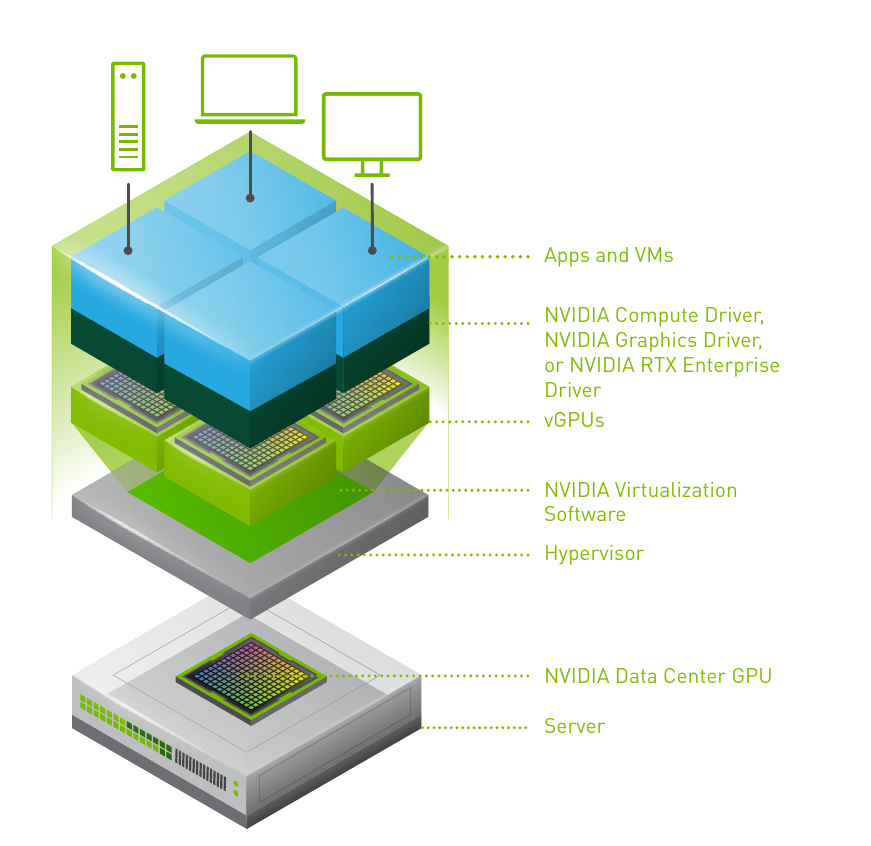
Fewer, bigger profiles or more, smaller ones — that is the trade the person running the server makes, and it is why the answer to how much VRAM do I get is a number somebody chose rather than the card's.
Asking for it
You cannot tick a box for this.
The profile your account may use is set on the account, not on the desktop, and setting it is a ticket through Àtom:
Please enable the
4QvGPU profile for user12345678a@edu.gencat.cat.
4Q is the usual one — a Q-series profile with 4 GB of reserved memory, which is what a virtual workstation profile looks like.
Ask at the start of the course, not the night before the assignment.
Once it is enabled, the profile appears in the create form's advanced options, and a desktop created with it has a real GPU inside it.
Booking
A GPU desktop is the case where Desktop's booking rule stops being theoretical.
Start one with no reservation:
$ isard start gpu-box
✓ Resolved desktop: gpu-box (state: Stopped)
✗ Cannot start gpu-box: booking required
Cannot start gpu-box: a booking is required before this desktop can be started.
Re-run with --book to create a booking starting now, or visit the IsardVDI web interface.
That is not a bug and it is not your quota. There are four profiles in the building and you are the fifth person to ask.
--book reserves the slot and starts:
$ isard start gpu-box --book --wait
✓ Resolved desktop: gpu-box (state: Stopped)
✓ gpu-box → Starting
✓ gpu-box is now Started
An hour by default. A longer session says so:
$ isard start gpu-box --book --book-minutes 180 --wait
✓ Resolved desktop: gpu-box (state: Stopped)
✓ gpu-box → Starting
✓ gpu-box is now Started
The web UI has a calendar for the same thing, and it is the better tool when you want a slot tomorrow rather than now.
TaskAsk, and then ask properly
Try to start a GPU desktop without a booking, read the error, then start it with one.
Show the solution
$ isard start gpu-box
✓ Resolved desktop: gpu-box (state: Stopped)
✗ Cannot start gpu-box: booking required
Cannot start gpu-box: a booking is required before this desktop can be started.
Re-run with --book to create a booking starting now, or visit the IsardVDI web interface.

$ isard start gpu-box --book --wait
✓ Resolved desktop: gpu-box (state: Stopped)
✓ gpu-box → Starting
✓ gpu-box is now Started
Worth doing once deliberately, so you know this error when you see it again. Running out of memory quota also refuses a start, but with a different message — Failed to start desktop — and the fix for that one is a smaller machine, not a booking.
The driver has to match
Now the part that wastes an afternoon.
A vGPU is not a whole card, and the guest driver talks to a host driver on the server. The two must be the same version.
Not compatible. The same.
Find out what the host is running:
$ nvidia-smi | grep -i "Driver Version"
| NVIDIA-SMI 535.183.06             Driver Version: 535.183.06   CUDA Version: 12.2     |
535.183.06 is the number to install in the guest.
Install a newer one — which is what every how to install NVIDIA drivers on Ubuntu page on the internet will tell you to do — and the driver loads, nvidia-smi fails, and nothing tells you why.
TaskCheck before you install
You have a GPU desktop. Before installing anything, find out which driver version it needs.
Show the solution
$ isard ssh gpu-box -- 'nvidia-smi | grep -i "Driver Version"'
| NVIDIA-SMI 535.183.06             Driver Version: 535.183.06   CUDA Version: 12.2     |
If nvidia-smi is not found at all, the guest has no driver yet and the version you need is the one the platform's documentation gives for your centre's servers — ask through Àtom rather than guessing.
The habit is the lesson: on a vGPU machine, what version comes before install.
Then use it
Once nvidia-smi answers inside the guest, the machine is an ordinary Linux box with a GPU in it.
$ isard ssh gpu-box -- nvidia-smi
+-----------------------------------------------------------------------------+
| NVIDIA-SMI 535.183.06             Driver Version: 535.183.06   CUDA 12.2     |
|-------------------------------+----------------------+----------------------+
| GPU  Name        Persistence-M| Bus-Id        Disp.A | Volatile Uncorr. ECC |
|   0  GRID RTX6000-4Q      On  | 00000000:00:05.0 Off |                  N/A |
|                               |    512MiB /  4096MiB |      0%      Default |
+-------------------------------+----------------------+----------------------+
4096MiB is the profile, not the card. That number is your budget, and it is the one to check a model against before downloading it.
Ollama is where that goes next.
Exercises
TaskRead the output
From the nvidia-smi block above, answer:
- Which profile is this desktop on?
- How much memory can a model use?
- Would a 7-billion-parameter model at 4-bit quantization fit?
Show the solution
GRID RTX6000-4Q— a Q-series profile carved out of an RTX 6000.4096MiB, of which 512 is already in use. So a little under 3.5 GB.- Roughly, yes — about 4 GB of weights at 4 bits, which is right at the edge and will depend on the context length you ask for.
The third answer is the useful one: on a vGPU the question will this model fit has a hard number, and it is smaller than the card's.
TaskBook, work, release
Book a GPU desktop for the shortest time you think you need, do something on it, and stop it before the slot ends.
Show the solution
$ isard start gpu-box --book --book-minutes 30 --wait
✓ Resolved desktop: gpu-box (state: Stopped)
✓ gpu-box → Starting
✓ gpu-box is now Started

$ isard ssh gpu-box -- nvidia-smi
...

$ isard stop gpu-box --wait
✓ Resolved desktop: gpu-box (state: Started)
✓ gpu-box → Stopping
✓ gpu-box is now Stopped
Stopping early is the exercise.
There are four of these in the building. The slot you give back is the one somebody else gets.